
Who Is This Guide For?
This guide is for US small business owners who are ready to scale, streamline their financial operations, and transition to outsourced accounting.
Meet Jamie: A Business Owner Ready to Scale
At 36, Jamie runs a $900K consulting firm in Seattle with three contractors. As her business grows, she needs to choose the right accounting platform because her upcoming outsourcing partner will be working directly within her software environment.
To make the right choice, Jamie is asking the following:
Which Accounting Software Should You Choose in 2026?
QuickBooks Online offers the broadest US accountant familiarity in reviewed market data, making it highly scalable for growing teams. Xero delivers the best value for collaboration with unlimited users on all plans. Zoho Books is the most affordable, offering a free tier for revenues under $50K, while FreshBooks is purpose-built for solo service providers tracking client time and invoicing.
Why Does the Choice of Accounting Software Matter More in 2026 Than It Did Two Years Ago?
In mid-2026, Intuit announced an ecosystem-wide price increase for its core QuickBooks Online tiers, raising monthly subscription rates for Essentials, Plus, and Advanced plans. These updates heavily impact growing small businesses that require multi-user features and robust inventory tracking.
If you're about to outsource your bookkeeping, this is the right moment to compare properly. Our outsourced bookkeeping service works inside your existing platform, so your software choice is part of the onboarding conversation we have with every client.
What Is the Quick Strategic Comparison Between All Four Platforms?
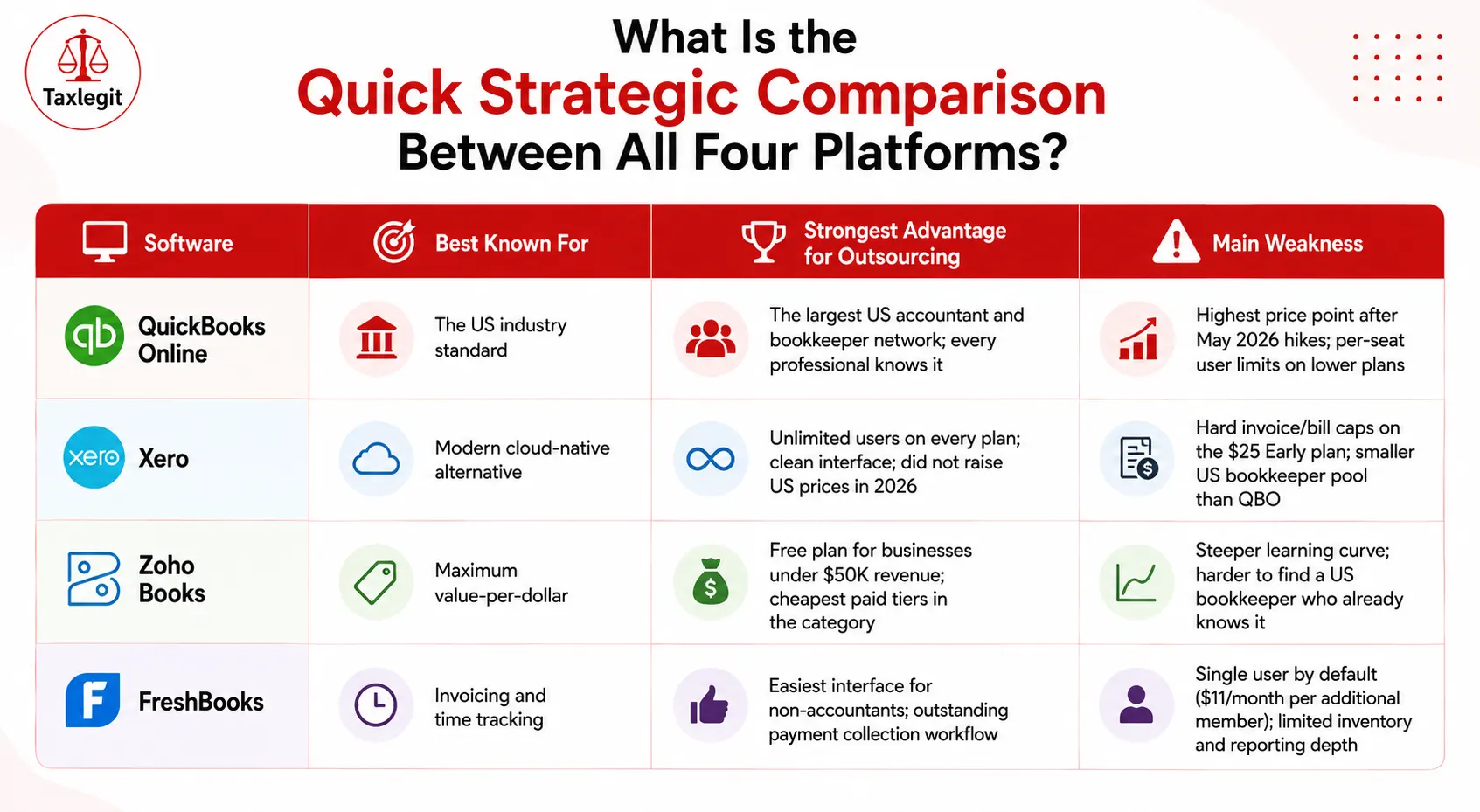
| Software | Best Known For | Strongest Advantage for Outsourcing | Main Weakness |
| QuickBooks Online | The US industry standard | The largest US accountant and bookkeeper network; every professional knows it | Highest price point after May 2026 hikes; per-seat user limits on lower plans |
| Xero | Modern cloud-native alternative | Unlimited users on every plan; clean interface; did not raise US prices in 2026 | Hard invoice/bill caps on the $25 Early plan; smaller US bookkeeper pool than QBO |
| Zoho Books | Maximum value-per-dollar | Free plan for businesses under $50K revenue; cheapest paid tiers in the category | Steeper learning curve; harder to find a US bookkeeper who already knows it |
| FreshBooks | Invoicing and time tracking | Easiest interface for non-accountants; outstanding payment collection workflow | Single user by default ($11/month per additional member); limited inventory and reporting depth |
QuickBooks Online Plan Comparison (Updated 2026)
QuickBooks Online (QBO) structures its tiers based on hard usage caps rather than a "pay-per-seat" pricing model. You do not pay an incremental fee for adding individual users; instead, if your team outgrows the allotted number of Included Billable Users, you must upgrade your entire subscription tier to unlock additional slots.
| QBO Plan | QBO Plan | Users Included | Best For |
| Solopreneur | $20/month | 1 | One-person businesses filing Schedule C only |
| Simple Start | $35/month | 1 | Solo service providers needing full double-entry accounting |
| Essentials | $70/month | 3 | Small teams needing bill management and time tracking |
| Plus | $110/month | 5 | Growing businesses with inventory and project tracking (most popular tier) |
| Advanced | $250/month | 25 | Larger SMBs with complex reporting and custom workflow needs |
Pricing data verified via the official QuickBooks Online Portal (Rates reflective of the August 2026 ecosystem updates).
The Real Catch in 2026: Factoring in Payroll
If you are budgeting around legacy pricing, adjust your estimates before finalizing a platform. In the 2026 ecosystem updates, QuickBooks Workforce (Payroll) remains a separate add-on. Total costs vary heavily by specific product tier, active employee count, state tax filings, and seasonal promotions.
To build an accurate budget, evaluate base fees and per-employee rates directly via the official QuickBooks Payroll Pricing Page.
This QuickBooks Payroll Plan Guide breaks down the specific tiers, base costs, and per-employee fees for adding payroll to your software stack.
Is Xero a Serious Alternative to QuickBooks Online for a US Business in 2026?
Yes, and the competitive gap between them has shifted notably. While QuickBooks Online implemented structural price hikes across its tiers, Xero has remained a highly competitive option for cost-conscious, collaborative teams.
According to the official Xero US Pricing Page, Xero structures its cloud accounting platform into three core plans (Data retrieved July 2026):
- Early ($25/month): Hard cap at 20 invoices and 5 bills per month best for low-volume freelancers.
- Growing ($55/month): Unlocks unlimited invoices and bills.
- Established ($90/month): Adds multi-currency tools, built-in project tracking, and advanced expense management.
The Core Differentiator: User Limits
A key operational difference lies in seat licensing: Every Xero tier includes unlimited users at no additional base cost, subject to plan permissions and fair-use terms. In contrast, QuickBooks Online enforces strict internal user limits per tier, requiring an upgrade to the next subscription level if your team expands.
Software-Subscription vs. Total Cost of Ownership
From a strict software-subscription standpoint, Xero provides significant cost benefits for small, collaborative teams. For an operation like Jamie’s firm where an outsourced bookkeeper and two internal team members all require system access Xero’s Growing plan ($55/month) is objectively less expensive than the base fee for QuickBooks Essentials ($85/month) to achieve an equivalent multi-user setup.
However, calculating your true Total Cost of Ownership (TCO) requires looking beyond base subscription stickers. A business's final bottom-line expense will also depend on:
- Third-Party Integrations: Subscription fees for adding external US payroll tools (like Gusto) or full-featured AP automations.
- Payment Processing: Merchant transaction fees incurred when clients pay invoices online.
- Accountant Familiarity: The potential operational cost of training a specialized team if your outsourced provider is only certified in a competing ecosystem.
- Implementation & Migration Effort: Upfront expenses related to data conversion, cleaning historical accounts, and mapping out a new ledger structure.
Who Should Choose Zoho Books?
Zoho Books is ideal if your US business earns under $50,000 annually (qualifying for their free tier) or if you leverage the integrated Zoho application ecosystem. According to the official Zoho Books US Pricing Page, opting for annual billing yields a 20% to 25% discount depending on the tier (data retrieved July 2026):
- Standard: $20/mo monthly vs. $15/mo annual (25% savings)
- Professional: $50/mo monthly vs. $40/mo annual (20% savings)
- Premium: $70/mo monthly vs. $60/mo annual (14.2% savings)
For outsourcing, Zoho Books is a good fit if you are already in the Zoho ecosystem (CRM, Projects, and Inventory) and want tight integration. Our accounting software setup service includes Zoho Books configuration for clients who choose it.
Is FreshBooks Actually Accounting Software or Just a Very Good Invoicing Tool?
FreshBooks began strictly as a specialized invoicing platform for freelancers but has since expanded its capabilities into a full double-entry accounting ecosystem.
Understanding FreshBooks' Dual Tier Limits
Unlike software platforms that restrict access purely by user count, FreshBooks features a hybrid pricing model that separates billable client limits from internal team seats. According to the official FreshBooks Pricing Page, standard monthly baseline rates accommodate only a single internal user and scale based on how many active clients you invoice.
- Lite ($23 / month): Strictly capped at 5 billable clients.
- Plus ($43 / month): Capped at 50 billable clients.
- Premium ($70 / month): Unlocks unlimited billable clients.
Operational Trigger Points: When Will You Outgrow It?
While highly effective for service-based businesses, FreshBooks is not engineered to support high-volume, product-centric operations or multi-company corporate structures. Rather than hitting an arbitrary chronological deadline, you may outgrow the platform as your inventory, entity tracking, or accrual-reporting needs become more complex.
Head-to-Head Accounting Platform Comparison
All rates reflect standard monthly list prices (excluding temporary introductory promotions) verified as of June/July 2026:
| Feature | QuickBooks Online | Xero | Zoho Books | FreshBooks |
| Entry-Level Price | $38/mo (Simple Start, 1 user) | $25/mo(Early, unlimited users) | $0 (under $50K rev) / $20/mo (Standard) | $23/mo (Lite, 5 clients, 1 user) |
| Most Popular Mid-Tier | $140/mo (Plus, includes 5 users.) | $55/mo(Growing, unlimited users) | $50/mo (Professional, 5 users) | $43/mo (Plus, 50 clients, 1 user) |
| Additional Users | 1–5 included by tier; Advanced ($340/mo) needed for more | Unlimited on every plan at no extra cost | $3/mo per additional user | $11/mo per additional team member |
| Transaction & Client Limits | None on any paid plan | Hard cap of 20 invoices + 5 bills on Early; unlimited on Growing+ | 1,000 invoices/year on free, generous thresholds by tier | Capped by billable clients: 5 (Lite), 50 (Plus), unlimited (Premium) |
| US 1099 & Payroll | Excellent: Native QB Payroll ($45+/mo + $6/employee) | Strong: 1099s built-in; native Gusto integration for payroll | Good: 1099 tracking; Zoho Payroll available in select states | Basic: Gusto payroll integration ($40/mo + $6/employee) |
| US Accountant Familiarity | Very High: The dominant platform in US professional networks | Moderate/Growing: Well known among modern cloud-based firms | Lower: Requires a tech-forward bookkeeper; partner pool is smaller | Moderate: Primarily used by freelancer-focused CPAs |
| Outsourced Bookkeeping Fit | Strongest: Widest network; seamless CPA year-end handoffs | Strong: Unlimited users make collaborative access cost-effective | Moderate: Excellent value if your bookkeeper is Zoho-trained | Narrow: Lite lacks CPA access; Plus+ required for clean team bookkeeping |
| Best For | Multi-employee businesses, e-commerce, and inventory tracking | Agencies, startups, and multi-user remote teams | Solopreneurs and scaling, budget-conscious businesses | Freelancers, consultants, and solo service providers |
Official Verification Sources:
- QuickBooks Online: Intuit QuickBooks Official Pricing
- Xero: Xero US Pricing & Plans Guide
- Zoho Books: Zoho Books Plans and Add-ons
- FreshBooks: FreshBooks Official Plan Comparison
Which Accounting Software Should You Actually Choose for Your Specific Situation?
The comparison table tells you the features. This section tells you the decision.
Choose QuickBooks Online if:
- You want access to the largest pool of US bookkeepers, CPAs, and tax professionals who already know your software.
- Your business has inventory, project costing, or multiple entities that require robust GAAP accounting.
- You plan to raise capital or need investor-grade financial reporting your CPA will thank you at year-end.
- You can absorb the May 2026 price increase and want the most-established platform in the category.
Choose Xero if:
- Your team has two or more people who need access to the books the unlimited-user model saves real money vs. QBD.
- You run a digital agency, tech startup, or remote-team business and prefer a cleaner, more modern interface.
- You want to avoid the May 2026 QBO price hike and still work with a platform your outsourced bookkeeper will know.
- You need multi-currency support without jumping to a premium tier.
Choose Zoho Books if:
- Your annual revenue is under $50,000, and you want a genuinely functional free accounting platform, not a trial.
- You are already using other Zoho products (CRM, Inventory, Projects) and want a tightly integrated ecosystem.
- You have a tech-forward outsourced bookkeeper who is Zoho-certified confirm this before committing.
- You want the lowest paid tier cost in the category without sacrificing double-entry accounting capability.
Choose FreshBooks if:
- You are a solo consultant, coach, designer, or freelancer whose primary accounting task is sending invoices and getting paid.
- You track hours billable to clients and need tight time tracking integrated into your accounting workflow.
- You have five or fewer active clients and want the simplest possible interface with the shortest learning curve.
- You do not sell physical products, do not have employees, and do not need GAAP accrual financial statements.
How Does TaxLegit Work Across All Four Platforms?
TaxLegit works within whichever accounting platform you bring to the engagement QuickBooks Online, Xero, Zoho Books, or FreshBooks. We connect to your existing system, restructure your chart of accounts if needed, and begin producing clean monthly financial statements from the first close cycle.
If you have not yet chosen a platform, our free financial workflow assessment includes a software recommendation based on your transaction volume, team size, compliance obligations, and reporting requirements. Book your free assessment at Taxlegit.
Call: +91 89292 18091 | Email: [email protected]
Frequently Asked Questions
No, QuickBooks Payroll is a separate add-on, billed on top of your base QBO subscription. After the May 2026 pricing increase, payroll also rose roughly 20%.
Xero handles US 1099 contractor reporting on all plans. For payroll, Xero integrates natively with Gusto, which provides full-service US payroll, including multi-state filing, W-2s, and direct deposit.
Zoho Books' free plan is limited to businesses with annual revenue under $50,000, supports one user plus one accountant, and caps invoices at 1,000 per year. Within those limits, it is a genuinely functional accounting platform.
Yes, though data migration is not always clean. QuickBooks has an export function that produces data files usable in both Xero and Zoho Books, but formatting mismatches and chart-of-accounts differences typically require manual cleanup.
QuickBooks Online gives you access to the largest pool of US bookkeepers and the smoothest year-end CPA handoff. If your primary concern is bookkeeper availability and tax-season compatibility, start with QBO.
Yes, Software subscription fees paid for accounting, bookkeeping, or financial management tools are classified as ordinary and necessary business expenses under Internal Revenue Code Section 162. They may be deductible in the tax year they are paid. This applies to QuickBooks Online, Xero, Zoho Books, FreshBooks, and any equivalent accounting software.
About the Author

Srijita
Content Writer
Srijita is a legal and financial content specialist with 5+ years of experience in the Indian corporate sector. She simplifies MCA regulations and tax compliance into clear, actionable insights for entrepreneurs, working closely with Chartered Accountants and legal experts to ensure accuracy and compliance. Reviewed by Vipul Sharma, Co-Founder, Taxlegit.